Real-Time Floor Indicator
Displays the current floor smoothly and clearly. Follow its movement instantly with animated directional arrows.
Add a modern touch to your building with these features:
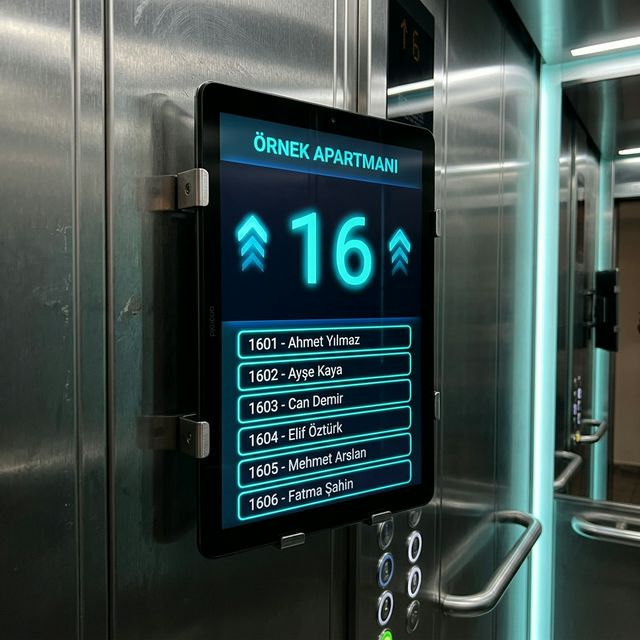
All the features to take your elevator information display to a professional level in one application.
Displays the current floor smoothly and clearly. Follow its movement instantly with animated directional arrows.
List the names of building residents with their apartment numbers. Easily update them using the management screen. Alternatively, create them automatically from a photo using AI.
Broadcast your advertisements or promotional videos on loop directly on the display screen.
Theme colors, background loop intervals, high-contrast mode — everything is under your control.
Processes GRAY code data from your elevator in real time. Features such as floor number, out of service, overload, and movement direction are reflected instantly.
With an optional touch screen, tap any floor on the list to send the elevator to your desired level. Residents and visitors can select a floor in one touch; calls are relayed via GRAY code integration.
A fully functional QWERTY keyboard ready for touch screens or remote control inputs.
Easily manage settings and content from inside the elevator with your existing TV remote, without needing an external device.
Take a photo (JPEG) of any printed document or board showing the current resident list and upload it to the system.
Our advanced optical character recognition (OCR) technology analyzes the photo within seconds, digitizing unit numbers and names automatically.
The recognized names and units will be placed directly into the application's resident template, removing the need for manual input.
All the features to take your elevator information display to a professional level in one application.
Yes, we guide you entirely through the installation process and provide dedicated remote technical support.
Our management panel is exceptionally user-friendly. With our AI-powered features, you can even just snap a picture of the physical list, and it'll transfer residents to the screen in seconds.
Absolutely. We provide volume licensing and exclusive discount rates for multiple properties. Contact us for further details.
Basic functions (floor indicator, resident directory) work without internet. Features like media playback and remote management require a shared network connection. Videos and background images sent via the LocalSend app are automatically recognized and displayed to users.
Yes. With the optional touch screen, you can tap a floor on the list to send the elevator to the selected level. This feature can be enabled on GRAY code compatible elevator systems.
Contact us to receive information about Asentra View, request a demo, or discuss specific custom development features.